AI Detection Guides
What Does Green Mean on Turnitin?
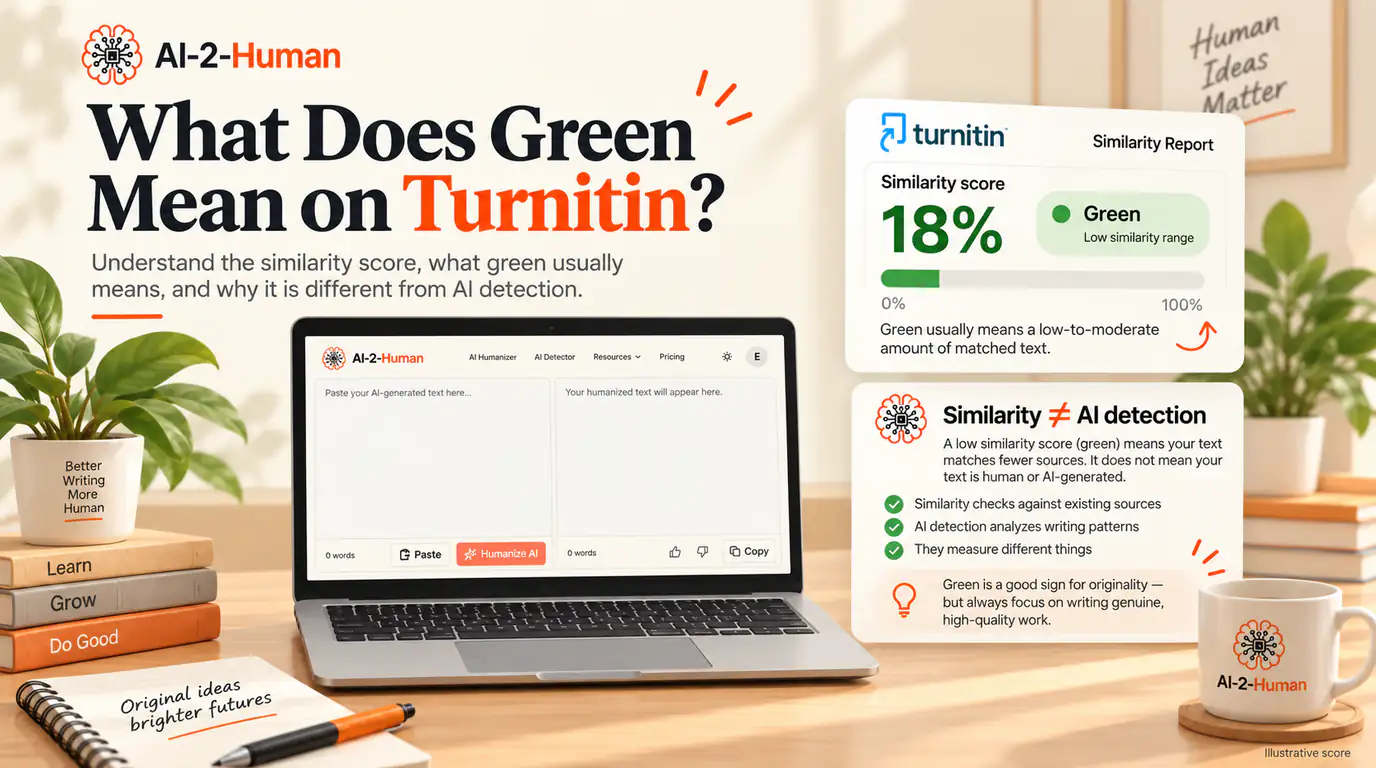
On Turnitin’s classic Similarity Report, green means that between one word and 24% of the submission matches text in Turnitin’s comparison database. It does not mean the work was plagiarised, and it does not mean the work is clear either. The score measures one thing only: how much of the text matches sources Turnitin already holds. Turnitin also notes that colour schemes can vary by integration, so the percentage and the Similarity Report matter more than the colour. A green score says nothing about whether the writing looks AI-generated, because Turnitin’s AI Writing Report is a separate measurement. This guide explains the scale, what green does and does not tell you, and what to review in the report itself.
What does green mean on Turnitin?
Green is the second-lowest band on Turnitin’s similarity scale, and it covers almost the entire low range: from one word up to 24% matching text. Blue, the band below it, is reserved for a submission with no matching text at all.
Typical Similarity Score colours in Feedback Studio and Originality Check:
- Blue: no matching text
- Green: one word to 24% matching text
- Yellow: 25 to 49% matching text
- Orange: 50 to 74% matching text
- Red: 75 to 100% matching text
Those five ranges come from Turnitin’s own documentation, and they are the ones most students see. Turnitin adds a qualification that matters: the colour scheme used for similarity scores may vary depending on the integration, and Turnitin describes that variation as expected and as something that does not affect the results. Read the percentage first, and treat the colour as a label for a range.
Why your Turnitin colours may look different
The colour is applied by the integration that displays the score, not by the Similarity Report itself. In February 2026 Turnitin updated the Similarity Score colours in Blackboard Ultra assignments to align with its Canvas and D2L integrations, and the update makes the point better than any explanation: a score of 0% is now shown in orange, because a zero can still deserve a close look even though it means no textual matches were found.
- 0%: orange
- 1 to 24%: green
- 25 to 49%: yellow
- 50 to 74%: orange
- 75% and above: red
What the Similarity Score actually measures
Turnitin compares a submission against a database of billions of web pages, including current and archived internet content, a repository of work students have submitted in the past, and a collection of thousands of periodicals, journals and publications. The Similarity Score is the percentage of the submitted text that matches something in that database.
Turnitin states plainly that it does not check for plagiarism in writing. It highlights matches, and it describes the score as a tool to use inside a review process that ends with a human judgement about whether academic misconduct is present. That is a description of matching text, not a verdict.
A green score is not a plagiarism verdict
The reverse is also true, and Turnitin says so explicitly: a high similarity score does not always suggest that a piece of writing has been plagiarised. The report is the beginning of a reading, not the conclusion of one.
Is a green Turnitin score good?
Often, a relatively low score is entirely normal, especially in a paper that cites its sources properly. What does not exist is a universal good number. Turnitin’s student guidance is direct: there is no fixed number to receive, and every school, instructor or assignment may consider a different amount of matching text acceptable. It suggests checking the syllabus, the assignment instructions or the instructor for expectations before submitting.
The more useful question is what is matching. A 15% score built from correctly quoted passages and a reference list is a different situation from a 5% score containing one uncited paragraph copied almost word for word. The percentage tells you how much matched. The report tells you what matched, and that is where the judgement happens.
Green is not a pass, and red is not a fail
It is tempting to read the colours as a grading system: green safe, yellow warning, red trouble. They are not grades. They group similar amounts of matching text.
Turnitin’s own examples show why context beats colour. A submission built from one copied passage scored 20%, while another student who quoted and referenced correctly scored 22%. Both matched the database, and the two situations are not alike. A qualitative study with an extensive bibliography and many required quotations scored 53%, above the institution’s threshold, purely because quotes and references were left in the report.
What to review in a green report
The score summarises; the report explains. Work through it in a fixed order rather than staring at the percentage.
- 1
Open the Similarity Report
It shows the matched text, the sources, and how much of each source was used.
- 2
Start with the largest matches
The biggest blocks of matched text deserve attention before scattered single phrases.
- 3
Open the matched source
Read enough of it to understand what kind of match you are looking at.
- 4
Classify the match
Quoted, cited, paraphrased, common wording, or material you submitted earlier.
- 5
Look closely at long continuous matches
An unbroken passage of several sentences is a different matter from a shared technical term.
- 6
Check the citations
Confirm that quoted and paraphrased material points to the source it came from.
- 7
Ask whether the wording is yours
If a passage follows a source closely and is not quoted, rewriting it in your own words is the real fix.
Why quotes and references can increase the score
Correct citation does not remove similarity, and Turnitin says so directly: even when a submission uses quotation marks and references, the quoted text will still show as a match. A properly referenced essay can therefore carry a green score, or a higher one, and still be entirely legitimate.
Similarity and attribution answer different questions. Similarity asks whether the words appear in the database. Attribution asks whether you credited the source. Instructors can exclude quotes and bibliographies from a report, which lowers the score without changing a single word of the writing, so two students with identical text can see different numbers depending on a setting.
That is also why chasing a very low score can backfire. Rewriting accurate quotations or standard terminology to make a number smaller weakens the paper without improving the writing, and the citation requirements of the assignment do not disappear.
Can Turnitin match your own previous work?
Yes, and this is one of the most common explanations for a score that looks too high. Turnitin’s database includes a repository of work students have submitted before, so a draft you submitted earlier, or a paper you submitted to an institutional repository, can match the version you submit later. Turnitin notes that overwritten or resubmitted papers may not generate a new report for a full 24 hours, precisely so a resubmission is not compared with its own previous draft.
Turnitin documents two scenarios worth knowing. Submitting several drafts of the same paper to the same repository has produced a final score of 100%. In the collusion scenario, one student submits a classmate’s paper and receives 25%, while the student who wrote it submits later and receives 100%. A high score on your own work is therefore possible without anything dishonest happening, and Turnitin recommends submitting only a final draft to a repository.
Does a green score mean your text is human-written?
No. Turnitin’s Similarity Score and its AI Writing Report are separate systems, and Turnitin states that the percentage produced by its AI writing detection model is different from and independent of the similarity score. AI writing highlights are not visible in the Similarity Report. A document can show a green similarity score and still carry a separate AI writing indication, and a document with a high similarity score can show little or nothing on the AI side.
- Similarity Score measures text that matches sources in Turnitin’s databases, and answers the question: does this text match material Turnitin already holds?
- AI Writing Report measures qualifying prose estimated as likely AI-generated, including text that may then have been modified by an AI paraphraser or bypasser, and answers a different question: does this prose resemble AI writing?
What if your green score is higher than you expected?
A higher-than-expected score usually has an ordinary explanation. Turnitin’s own examples cover most of them.
- Direct quotations left inside the report
- A reference list or bibliography counted as text
- Common phrases, titles and standard terminology
- Template wording copied from the assignment brief
- Your own earlier submission or draft
- Source material paraphrased too closely
- Long passages built from a single source
- Formatted references and citation styles
Practical next steps: open the largest matches first, check that every quoted and paraphrased passage is attributed, rewrite passages that follow a source too closely in your own words, and ask your instructor what the assignment expects. Revising from understanding fixes the similarity question and improves the writing at the same time.
Is 0% similarity better than green?
Not necessarily, and Turnitin suggests the opposite. Zero similarity may indicate that you are not using any source-based evidence, which many assignments require. Turnitin’s student guidance says that some similarity is expected, and that a legitimate paper built on research will normally match part of the database.
Aiming mechanically for 0% pushes writers to rewrite accurate quotations, technical terms and correctly cited material, which damages the work rather than improving it. The goal is not the lowest possible number. It is appropriate attribution and your own reasoning, expressed in your own words.
What the current AI Writing Report shows
The AI Writing Report displays one overall percentage for qualifying text, which Turnitin defines as prose sentences contained in a long-form piece of writing. The model does not reliably assess non-prose such as poetry, scripts or code, and it does not assess short-form or unconventional writing such as bullet points, tables or annotated bibliographies, which is why a document mixing formats can show a percentage that does not match its highlights.
Turnitin presents that percentage in a separate AI Writing tab rather than inside the similarity view, and it only appears when AI writing detection is enabled for the account. Two current details are worth knowing. Percentages above 0% and below 20% are not surfaced: the report shows an asterisk instead, because Turnitin found a higher incidence of false positives in that range. And since August 2026 the AI report uses one unified blue highlight for likely AI-generated content, including text that may have been modified by paraphrasers or bypassers, replacing the earlier two-colour scheme.
Want to check AI-related signals too?
A green Similarity Score tells you that your text matches very little in Turnitin’s databases. It does not tell you whether your writing looks AI-generated to another detector, and it says nothing about how the text was produced. Those are different measurements, and teachers increasingly look at both.
If you want that second signal before you submit, run your text through AI-2-Human’s AI Detector. It gives another reading of the same passage and points to the sections that look most machine-like, so you can decide whether anything genuinely needs rewriting.
If a passage genuinely reads as repetitive or mechanical, AI-2-Human Humanizer can help you rewrite it more naturally. Keep quotations and source attributions intact while you revise: the goal is clearer writing, not hiding copied material.
Before you submit: a practical checklist
- I read the percentage instead of stopping at the colour.
- I checked whether my integration uses a different colour scheme.
- I opened the Similarity Report rather than judging the score on its own.
- I looked at the largest matches first.
- I checked that quoted and paraphrased material is attributed to its source.
- I considered whether any match comes from my own earlier submission.
- I remembered that similarity is neither a plagiarism verdict nor an AI verdict.
- I know that the AI Writing Report is a separate measurement with its own scale.
- I revised only the passages that actually needed rewriting, keeping citations intact.
Frequently asked questions
In classic Turnitin Feedback Studio, green generally represents between one word and 24% matching text. Turnitin also notes that colour mappings can vary depending on the product or LMS integration, so the percentage and the actual source matches are more useful than the colour alone.
On the common Feedback Studio and Originality Check scale, green covers one word to 24%, yellow covers 25 to 49%, orange covers 50 to 74% and red covers 75 to 100%. Blue is reserved for no matching text. Because integrations can display different colours, always check the percentage shown next to the colour.
Often a low score is completely normal, but there is no universal good number. Turnitin states that there is no fixed number to receive and that every school, instructor or assignment may consider a different amount of matching text acceptable. What matters is what the report shows as matching.
Not automatically. A 20% Similarity Score could consist mostly of correctly quoted and cited material, or it could contain one or more problematic matches. Turnitin’s own examples include a 20% score from a copied passage and a 22% score from properly sourced quotes, so the report matters more than the number.
It sits comfortably inside the green band, and it is a very common result for a paper that uses sources and cites them. It still deserves a look: a report with one uncited paragraph can produce a low percentage and a real problem, so open the matches rather than trusting the number.
No. Turnitin’s Similarity Score measures matching text, and Turnitin states that it does not check for plagiarism. A low green score can sit alongside an improperly copied passage, and a higher score can come from legitimate quotations and references.
A similarity score is not a pass or fail mark and Turnitin does not present it as one. Whether your submission meets expectations depends on your institution’s and instructor’s rules, on what the matches actually are, and on other integrity checks that are separate from similarity.
Because similarity measures matching text, not attribution. Turnitin says that even when a submission uses quotation marks and references, the quoted text still shows as a match. A match can be perfectly legitimate; the question is whether the source is credited properly.
Yes. Reference lists are text, so they can match other sources, and Turnitin documents a case where a required bibliography and a heavy use of quotations produced a 53% score that exceeded the institution’s threshold. Instructors can exclude quotes and bibliographies, which lowers the displayed score without changing the writing.
Yes. Turnitin’s database includes a repository of previously submitted student work, so an earlier draft or a paper stored in an institutional repository can match a later submission. Turnitin documents a case where submitting several drafts of the same paper produced a final score of 100%, and it recommends submitting only the final draft to a repository.
Not necessarily. Turnitin says some similarity is expected, and that zero similarity may indicate a lack of source-based evidence, which many assignments require. Rewriting accurate quotations and technical terms to reach zero weakens the paper rather than improving it.
No. Turnitin states that the percentage produced by its AI writing detection model is different from and independent of the similarity score, and that AI writing highlights are not visible in the Similarity Report. Similarity describes source matching; the AI Writing Report estimates qualifying prose that may have been AI-generated or AI-modified.
Yes, because the two systems are independent. A submission can match very little in Turnitin’s databases and still carry a separate AI writing indication, and the reverse can also happen. The colour of the similarity pill tells you nothing about the AI Writing Report.
Check with the AI Detector →Open the report and start with the largest matches. Check whether quotations are properly attributed, whether a reference list or template wording is inflating the number, whether your own earlier submission appears, and whether any passage follows a source too closely. If the assignment is unclear, ask your instructor what it expects.
Yes. The AI-2-Human Detector gives you a separate reading of the same text and highlights the sections that look most machine-like, which is a different measurement from a similarity score. Use it before you submit if you want a second opinion on the AI signal.
Run the AI Detector →Sources & editorial notes
- Turnitin: understanding the similarity score
- Turnitin: understanding the similarity score for students
- Turnitin: using the AI Writing Report
- Turnitin: how to access the AI Writing Report
- Turnitin: integrations release notes
- Turnitin: product updates
AI-2-Human is not affiliated with or endorsed by Turnitin. Turnitin documentation was reviewed on September 20, 2026. Similarity Score colours, report behaviour and product features can vary by integration and can change over time, so check the current Turnitin documentation before relying on any detail quoted here.
Updated